4.4 Interacting with the Unified Inbox via the API
ReactIn’s Unified Inbox brings every LinkedIn conversation generated by your campaigns into a single place.
Written By François Delporte
Last updated 4 months ago
The Unified Inbox API exposes that same data programmatically, so you can sync conversations into your CRM, build custom reply workflows, trigger alerts on new messages, or send replies from your own tooling.
This guide walks through authentication, every available endpoint, pagination, rate limits, and error handling — with copy-paste curl examples.
Prerequisites
Before you start, you need two things:
Your Organization ID — identifies which workspace you’re querying.
Your API Key — a secret token used to authenticate every request.
Both are available in the app under Settings → API Keys.
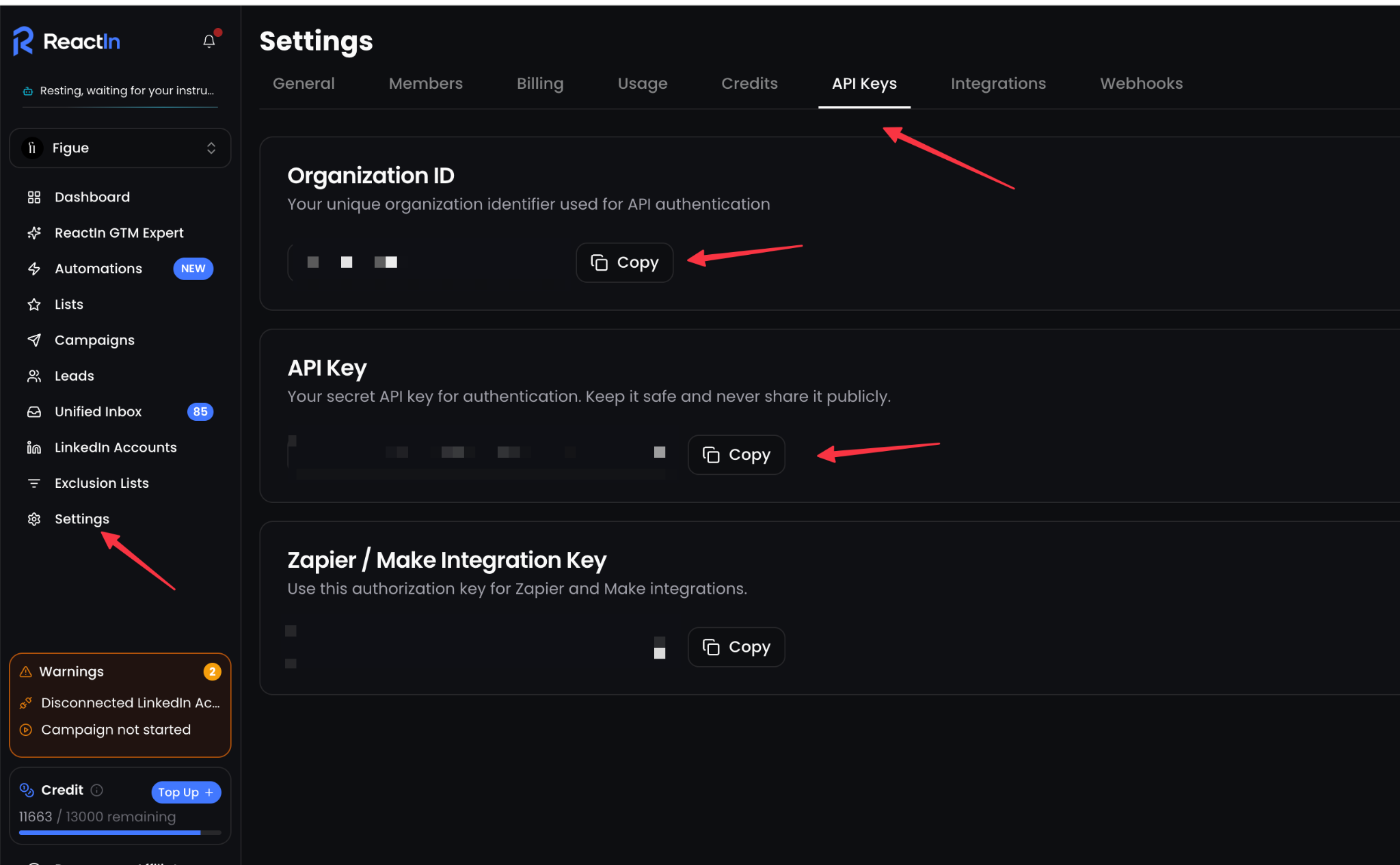
Keep your API key secret. It grants full read/write access to your organization’s inbox. Never commit it to source control or expose it in client-side code. If it leaks, rotate it from the same page.
Base URL
All endpoints are served under your ReactIn instance: https://app.reactin.io/api
Every path is scoped to your organization: https://app.reactin.io/api/{organizationId}/...
Authentication
Authenticate by sending your API key in the Authorization header. Both the Bearerprefix and a raw token are accepted: Authorization: Bearer YOUR_API_KEY
A missing or invalid key returns 401 Unauthorized.
Endpoints
The Unified Inbox API has three endpoints:
1. List conversations
GET /api/{organizationId}/conversations
Returns conversations linked to your organization’s connected LinkedIn accounts, sorted newest-first (most recent message at the top). Only conversations that have at least one message and are tied to one of your campaigns are returned.
Query parameters
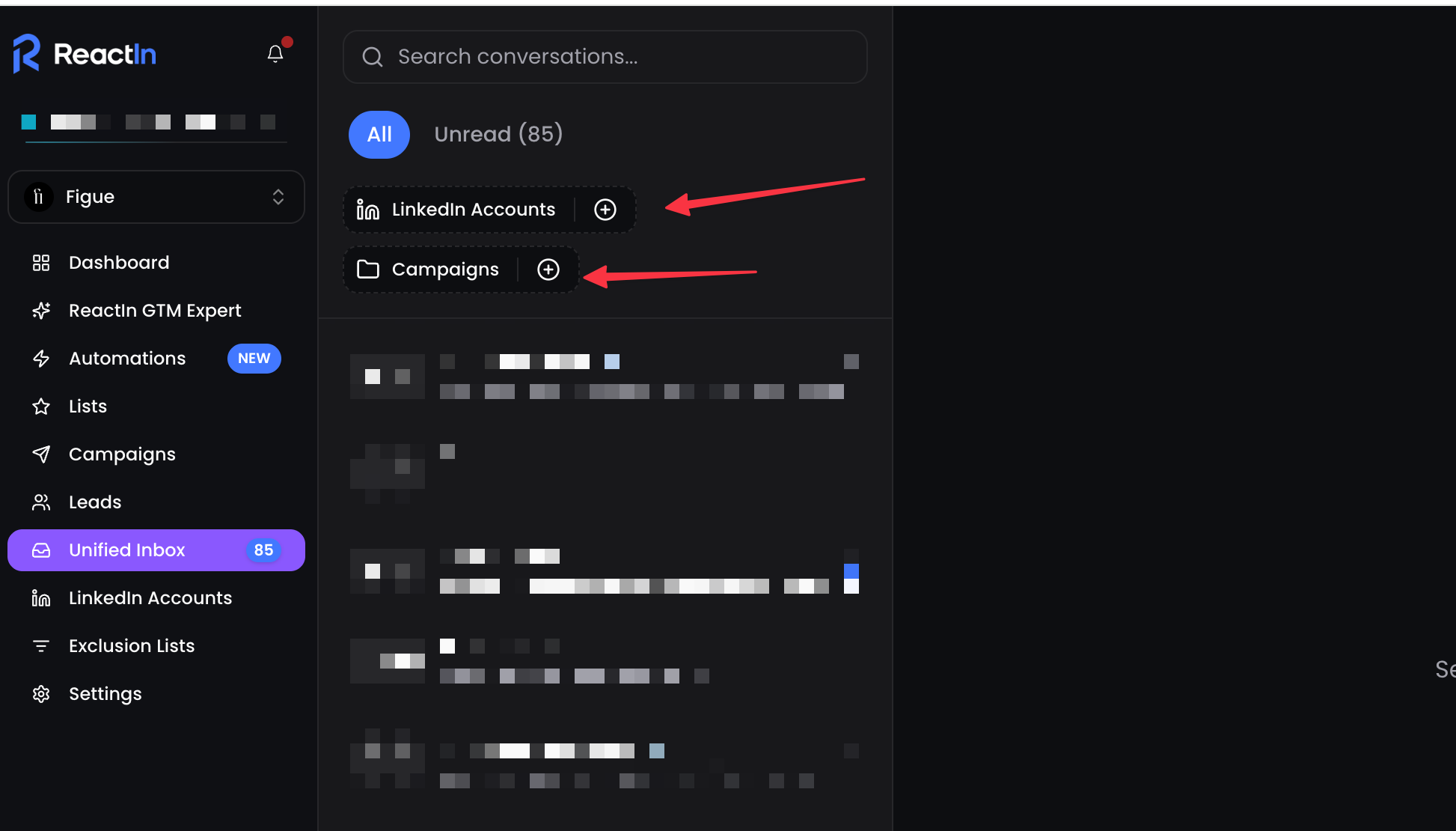
You can find a campaign’s ID in the campaign URL or campaign settings, and a LinkedIn account’s ID in your connected accounts list.
Example request
curl -s \

  -H "Authorization: Bearer YOUR_API_KEY" \

  "https://app.reactin.io/api/ORG_ID/conversations?limit=20&search=acme"
Example response
{

 "items": [

    {

      "id": "conv_a1b2c3",

      "name": "Jane Doe",

      "lastMessage": {

        "id": "msg_998877",

        "userId": "li_account_42",

        "text": "Thanks, that works for me!",

        "timestamp": "2026-05-19T10:48:00.000Z"

      },

      "unreadCount": 2,

      "isDisconnected": false,

      "participantsToDisplay": [

        {

          "id": "participant_77",

          "name": "Jane Doe",

          "avatarUrl": "https://media.linkedin.com/...",

          "linkedinUrl": "https://www.linkedin.com/in/janedoe",

          "headline": "Head of Growth at Acme",

          "company": "Acme",

          "leadId": "lead_55"

        }

      ]

    }

  ],

  "nextCursor":"conv_a1b2c5",

  "totalUnread": 7

}
Response fields
items[] — the conversations on this page.
lastMessage — the most recent message, or null if none.
unreadCount — unread messages in this conversation.
isDisconnected — true if the underlying LinkedIn account is disconnected (you cannot send messages there).
participantsToDisplay[] — the LinkedIn contacts in the conversation. leadIdis set when the contact is matched to a lead in your ReactIn workspace.
nextCursor — pass this as cursor to fetch the next page, or null when there are no more.
totalUnread — total unread messages across all conversations (not just this page).
2. List messages in a conversation
GET /api/{organizationId}/conversations/{conversationId}/messages
Returns the messages of a conversation, sorted newest-first.
You can copy a conversation’s ID from the Unified Inbox — open the conversation and use the ID from the URL.
Query parameters
Example request
curl -s \

  -H "Authorization: Bearer YOUR_API_KEY" \

  "https://app.reactin.io/api/ORG_ID/conversations/conv_a1b2c3/messages?limit=50"
Example response
{

   "items": [

    {

      "id": "msg_998877",

      "userId": "li_account_42",

      "text": "Thanks, that works for me!",

      "timestamp": "2026-05-19T10:48:00.000Z",

      "readAt": null,

      "metadata": {

        "campaignEvent": {

          "id": "evt_123",

          "campaign": { "id": "camp_9", "name": "Q2 Outreach" }

        },

        "sentFromInboxByUserId": null,

        "sentFromInboxByUserName": null,

        "sentFromInboxByUserEmail": null

      }

    }

  ],

  "nextCursor": "msg_998800",

  "conversation": {

    "id": "conv_a1b2c3",

    "name": "Jane Doe",

    "lastMessage": { "...": "..." },

    "unreadCount": 2,

    "participantsToDisplay": [ { "...": "..." } ]

  }

}
Response fields
items[] — the messages on this page.
userId — the sender. For messages sent by your LinkedIn account this is the account’s provider ID; for incoming messages it is the contact’s provider ID.
metadata.campaignEvent — set when the message was generated by a campaign step; null otherwise.
metadata.sentFromInboxByUser* — populated when a teammate sent the message from the Unified Inbox UI. Messages sent through this API have these fields set to null, which lets you distinguish API traffic from manual replies.
nextCursor — cursor for the next (older) page, or null.
conversation — the parent conversation metadata, so you don’t need a separate call.
3. Send a message
POST /api/{organizationId}/conversations/{conversationId}/messages
Sends a LinkedIn message in an existing conversation. The message is delivered through the LinkedIn account that owns the conversation.
Request body
Example request
curl -s -X POST \

  -H "Authorization: Bearer YOUR_API_KEY" \

  -H "Content-Type: application/json" \

  -d '{"content":"Hi Jane, following up on our chat — does Thursday work?"}' \

  "https://app.reactin.io/api/ORG_ID/conversations/conv_a1b2c3/messages"
Example response
The created message is returned, using the same shape as in the messages list:
{

  "id": "msg_998900",

  "userId": "li_account_42",

  "text": "Hi Jane, following up on our chat — does Thursday work?",

  "timestamp": "2026-05-19T11:02:00.000Z",

  "readAt": null,

  "metadata": {

    "campaignEvent": null,

    "sentFromInboxByUserId": null,

    "sentFromInboxByUserName": null,

    "sentFromInboxByUserEmail": null

  }

}
Notes
The conversation’s LinkedIn account must be connected. Sending to a disconnected account returns 409 Conflict.
A conversation can only receive messages once it has a chat thread on LinkedIn’s side. If the chat isn’t ready yet (no incoming message received), the API returns 409 Conflict— it becomes sendable after the first reply.
Messages sent via the API bypass your organization’s daily sending limits, so use this endpoint responsibly.
Pagination
All list endpoints use cursor-based pagination:
Make the first request without a cursor.
If the response has a non-null nextCursor, pass it as the cursor query parameter on the next request.
Stop when nextCursor is null.
# Page 1
curl -H "Authorization: Bearer YOUR_API_KEY" \

  "https://app.reactin.io/api/ORG_ID/conversations?limit=30"
# Page 2 — reuse nextCursor from the previous response
curl -H "Authorization: Bearer YOUR_API_KEY" \

  "https://app.reactin.io/api/ORG_ID/conversations?limit=30&cursor=2026-05-19T10:48:00.000Z%7Cconv_a1b2c3"
Treat the cursor as an opaque string — don’t construct or parse it yourself. Remember to URL-encode it (the | character becomes %7C).
Rate limits
Requests are rate-limited per organization:
Every response includes the current limit state:
X-RateLimit-Limit: 30
X-RateLimit-Remaining: 28
X-RateLimit-Reset: 1747650000
When you exceed the limit you receive 429 Too Many Requests with a Retry-After header (in seconds). Back off and retry after that delay.
Error handling
The API returns standard HTTP status codes:
Error responses include a JSON body with a human-readable message, for example:
{ "message": "Cannot send message: the LinkedIn account is disconnected" }
Putting it together
A typical integration loop looks like this:
Poll GET /conversations and store totalUnread to detect new activity.
For each conversation with unreadCount > 0, call GET /conversations/{id}/messagesto fetch the latest exchange.
Run your own logic (CRM sync, AI drafting, routing, alerts).
Optionally reply with POST /conversations/{id}/messages.
Because nextCursor is stable and ordering is newest-first, you can stop paginating as soon as you reach a message you’ve already processed — no need to walk the full history every time.
Next steps
Grab your Organization ID and API Key from Settings → API Keys.
Try the GET /conversations call above to confirm authentication works.
Build from there: a CRM sync, a Slack notifier on new replies, or an AI-assisted reply drafter.